Vendor payments in Production Accounting are permission based
To use PAS to pay vendors, your account must have one of the following roles enabled:
Role: Company Admin, Accountant
Custom role with: Accounting & Cost Tracking / Vendor payments - Full access
Overview
When the Production Accounting Suite (PAS) is enabled for your company, you can pay vendors directly from the project's Accounts payable dashboard. Vendor payments are processed in batches, giving you control over which invoices to pay together and when.
Notes:
Vendors can be added at the project level, but are accessible at the company level.
Vendor payments are recorded in PAS as accounting transactions on the Accounts payable dashboad, that can be reviewed, edited, and posted to the General Ledger (GL)
Currently, it's only possible to pay vendors in USD. International payments that require currency conversion are not supported.
Pay vendors in a batch
Before you can pay a vendor, the AP invoice must first be created and posted to the GL. See Create an AP invoice (PAS) for instructions. Once your invoice is created, you’re ready to post and create a payment batch.
Step 1: Post the AP invoice
From the Accounts payable dashboard, filter by vendor to locate the transaction(s) you want to pay
Click the TRX#s for the unposted transactions
On the AP invoice, click the Go to Posting button
On the Posting page, click to select the TRX#s, then click Post
In the Confirm posting popup, update any options if applicable, then click Confirm and post
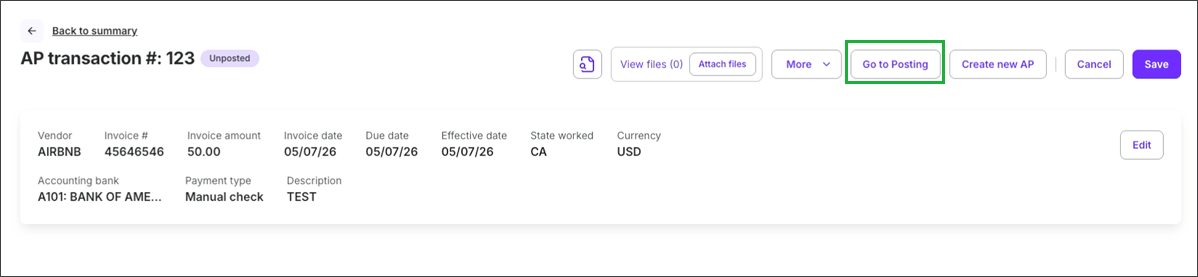
Click the Go to Posting button
Step 2: Create a payment batch
Return to the Accounts payable dashboard and click the Create payment batch button
In the Create payment batch popup, select the Bank and Payment type, then click the Continue button
On the Select invoices to pay page, click to select the invoice(s) you want to include in this batch
Click the Create payment batch button at the bottom of the page
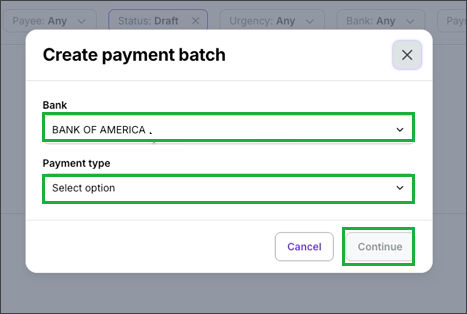
Select the Bank and Payment type, then click the Continue button
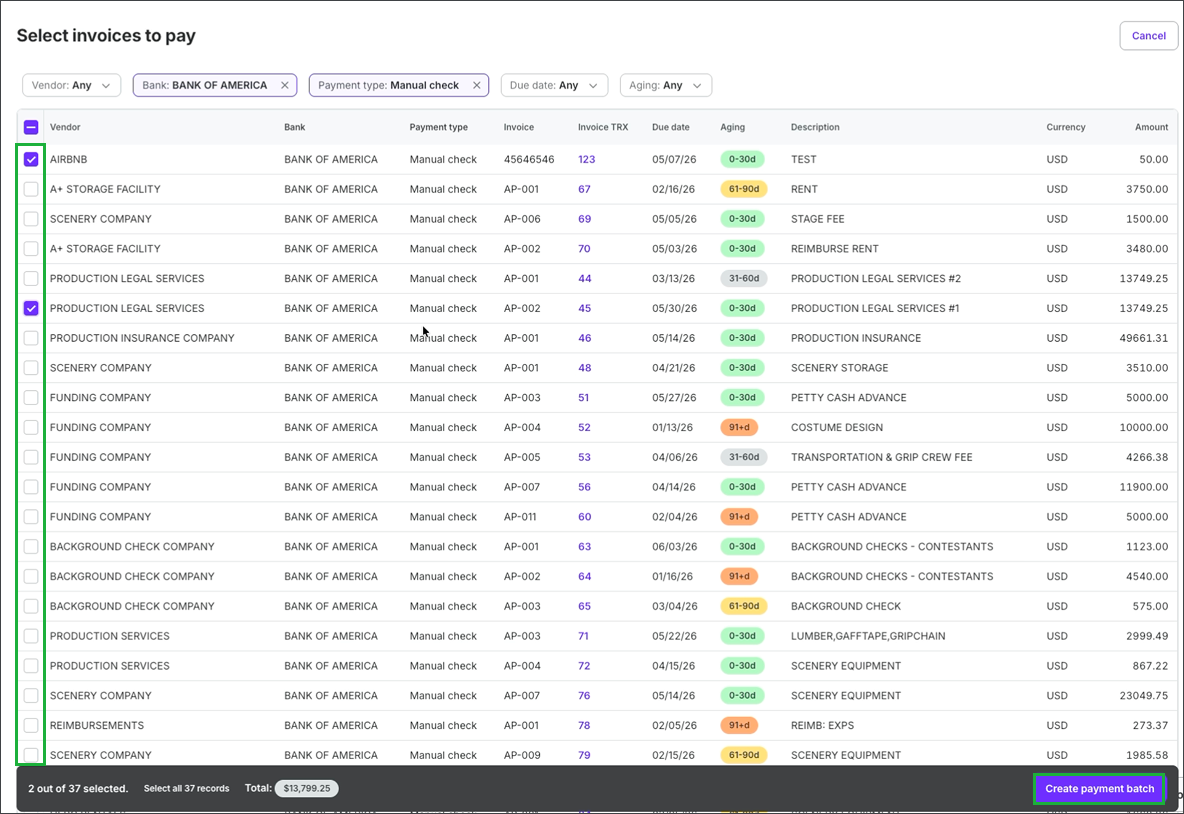
Click the checkboxes to select the invoices and then click the Create payment batch button
Step 3: Process the payment
Follow the steps to process payment based on the payment type you’ve selected for the batch.
Once the batch payment has been processed, the batch status changes from Processing to Paid and the batch invoices move to the Paid tab on the Accounts payable dashboard.
Payment type
You’ll be prompted to select your payment type when creating a batch of vendor payments.
Wrapbook supports the following payment methods for vendor payments in PAS:
CASHétPay
CASHétPay is a third-party provider of digital payment services for the production industry. Wrapbook processes all digital vendor payments through CASHétPay.
You'll need to set up a CASHétPay account before you can use this payment type. To get started:
Visit the CASHétPay website
Or email info@cashet.com to request account setup
Once you have a CASHétPay account, you can use it to pay vendors in Wrapbook. Contact your Customer Success Manager or Wrapbook Support for more information.
Paper checks
Wrapbook's Production Accounting Suite (PAS) gives you two options for paying vendors by check — you can print checks directly from Wrapbook using your own check stock, or write checks outside of the system and record the payments in Wrapbook to keep your books up to date.
If you want to print checks directly from Wrapbook, set the Payment type to Check when batching the invoices
If you want to use checks created outside of Wrapbook, set the Payment type to Manual check when batching the invoices
To learn more about using checks to pay vendors, see Paper checks.
Direct ACH vendor payments
When you use Direct ACH vendor payment, Wrapbook sends the ACH transfer directly—no NACHA file download or bank upload is needed
To learn more about using Direct ACH to pay vendors, see the Direct ACH Vendor Payments Setup Guide (PAS).
Reverse a vendor payment
If a payment was issued in error or needs to be reissued, you can void it from the Accounts payable dashboard.
From the Accounts payable dashboard, click the Payment # for the payment you want to reverse
In the Payment details drawer, choose one of the following options at the bottom:
Void and cancel — voids the payment permanently with no reissue
Void and reissue — voids the payment and initiates a new one
If you click the Void and reissue button, click the Confirm button in the popup
Optionally, enter a note explaining the reason for the reissue in the Activity field
Note: Both void options are permanent and cannot be undone. Confirm the correct payment before proceeding.
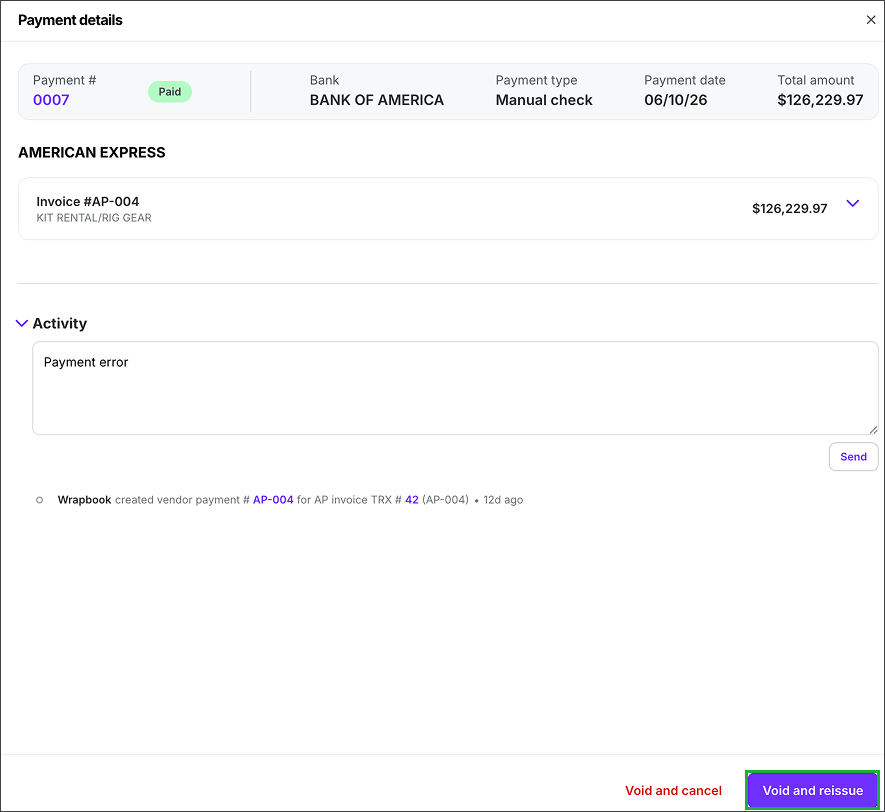
Click the Void and reissue button
Vendor payments FAQ
To help you understand vendor payments in Wrapbook, we’ve put together this list of frequently-asked questions.
Click the arrow next to a question to see the answer.
Can I use Wrapbook to pay vendors?
Yes, you can use Wrapbook to pay vendors if:
The Production Accounting Suite (PAS) is enabled for your company’s Wrapbook account
Your company has the ability to transfer payment funds via a Direct ACH vendor payment, or CASHétPay account
What’s CASHétPay?
CASHétPay is a third-party provider of digital payment services for the production industry. You can learn more by going to the CASHétPay website.
Why is my CASHétPay payment failing or not going through?
If you're unable to process a vendor payment using CASHétPay, your company may not have an active CASHétPay account set up in Wrapbook. The payment will remain unpaid until the account is active — you don't need to re-enter the invoice.
To get started with CASHétPay:
Visit the CASHétPay website
Or email info@cashet.com
Once your account is active, you can retry the payment from the same invoice. If you're not sure whether your account is set up, contact your Customer Success Manager or Wrapbook Support.
What type of check stock do I need for printing paper checks?
Checks should be printed on MICR check stock. We recommend blank check stock with the long stub on top and check on bottom.
How do I turn on multi-factor authentication?
Wrapbook requires multi-factor authentication to be enabled for users printing checks for security purposes. To see how, go to Multi-factor authentication (MFA).
Is there a fee for printing checks via Wrapbook?
No, there are no fees associated with check printing. You will only be responsible for purchasing your own check stock.
I see a Vendor payments option in the left-side navigation. Can I use this instead of the Accounts payable dashboard?
Most clients using Production Accounting Services (PAS) process vendor payments through the Accounts payable dashboard, which uses a tabbed interface and requires payments to be grouped into a batch before processing.
The Vendor payments dashboard is available if your company is using NACHA files to process vendor payments.