The following help article provides general instructions on how to complete this form in Wrapbook. If you have questions about how to complete tax information based on your specific situation, consult with a CPA or other tax professional.
Overview of Form W-9
A W-9 is a tax form used by the IRS to collect information from U.S. contractors and loan-out companies. It serves several important purposes:
Collects your Taxpayer Identification Number (TIN) - either your Social Security Number (SSN) for individuals or Employer Identification Number (EIN) for loan-out companies
Verifies your tax classification - particularly important for loan-out companies, which must be either S Corporations or C Corporations when working with Wrapbook
Provides certification that:
Your TIN is correct
You're not subject to backup withholding
You are a U.S. person
The information you provide on your W-9 must exactly match your tax records to ensure accurate tax reporting.
Who needs to complete Form W-9
Form W-9 (Request for Taxpayer Identification Number and Certification) is required for all U.S. contractors and loan-out companies working through Wrapbook.
Why Form W-9 is important
Workers classified as loan outs must complete Form W-9 In order to use Wrapbook. If you don't fill out a W-9 when required:
You won’t be able to submit your timecards or receive payments
You may be subject to backup withholding, where the payer must withhold a percentage of your payments to ensure tax compliance
Your payments will be subject to mandatory 1099 reporting regardless of the amount
How Your W-9 Identity Works in Wrapbook
When you're paid through Wrapbook, your W-9 determines how your earnings are reported to the IRS. Whether your payments are tied to your personal SSN or a business EIN depends on your loan-out status.
If you’re not a Loan Out: Your W-9 will use your personal name and SSN. Wrapbook can only route payments through a business entity if that entity is a qualifying loan-out company: S-Corp, C-Corp, or an LLC filing as an S-Corp or C-Corp. Other business types are not eligible.
If you’re a Loan Out: Your W-9 will reflect your loan-out company's legal name and EIN. Wrapbook automatically populates your W-9 using the information in your Loan-out Info.
What about kit and box fees?
If you are not set up as a loan out, all payments — including kit fees and box rentals — are tied to your personal SSN. This is because Wrapbook reports all line items under the same tax identifier on file for you.
How W-9s are completed in Wrapbook
In Wrapbook, if you’re classified as a loan-out worker, your primary details and the information required for Part I of the Form W-9 are automatically added to your Form W-9 based on the information in your Loan-out Info.
This information includes:
Company Legal Name
DBA
EIN
Federal Tax Classification
Address
Jurisdiction of Incorporation
Article of Incorporation
You can update this information only if you haven’t received a payment from Wrapbook.
To update your W-9 information as a loan-out worker:
In the left-side navigation, click Settings
On your Settings page, click the Edit button next to Loan-Out Info
After you’ve made your changes, click the attestation and then click the Save button. Once you do this, your W-9 in Wrapbook will be automatically updated to include the new information.
If you’ve already received a payment, this information will be locked. In this case you’ll need to reach out to our Support Team for help updating this information.
How to find your Form W-9 in Wrapbook
In Wrapbook you can access Form W-9 from your Tax documents.
To access:
In the left-side navigation, click Tax documents
Your W-9 will be listed on the page. Click the button next to it to view its details.
How to enter Form W-9 exemptions and/or backup withholding
To update the exemption information that appears in Box 4 of your Form W-9 in Wrapbook and/or your backup withholding information:
In the left-side navigation, click Tax Documents
Click the Edit button next to W-9 Form.
Click the dropdown menus to update your exemptions and/or backup withholding information. If you make updates to your exemptions and/or backup withholding information, be sure to click the Save & continue button to re-sign your W-9 Form. Note that the changes will be reflected going forward only. Changes are not retroactive.
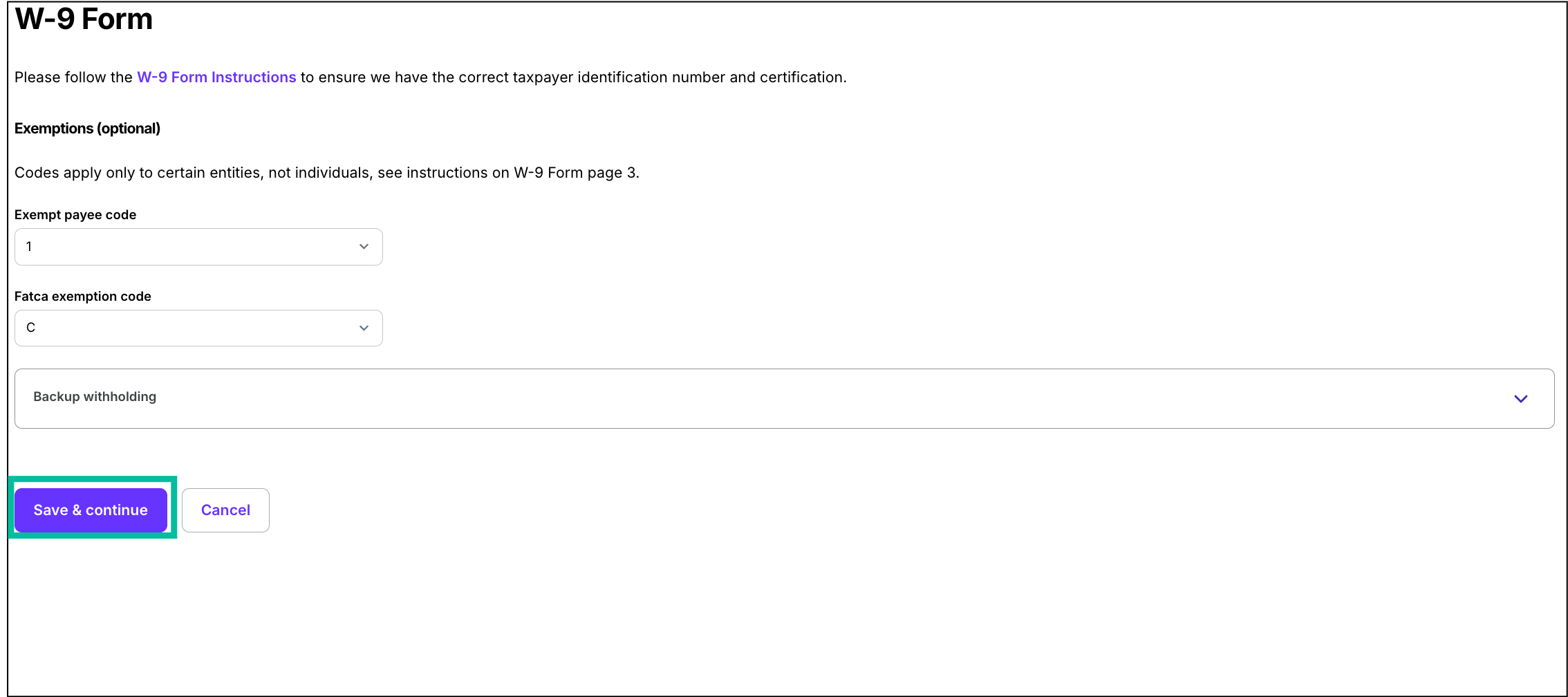
Click any of the fields to make your updates, then click the Save & continue button
How to sign your Form W-9
In the left-side navigation, click Tax Documents
Next to W-9 Form click the Review & Sign button
On the Review and sign W-9 Form page, under Please enter your full name to sign, click the field to enter your full name as it appears in the Form and then click the Submit button
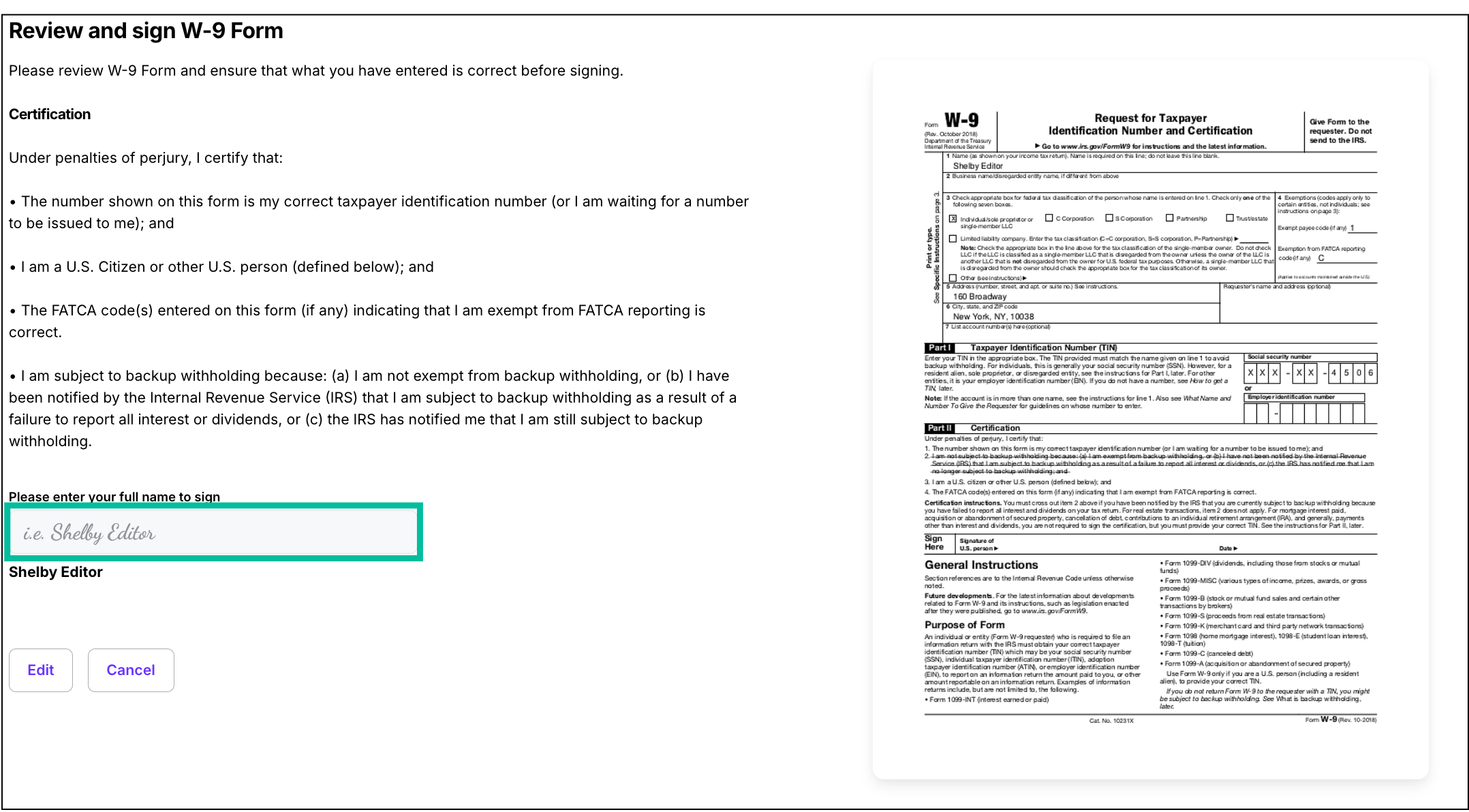
Important Notes
All information must match your tax records exactly
If the information entered in your Settings, Loan-Out Info or Profile indicates that you should complete a Form W-9, you’ll be automatically prompted to review the information entered in the Form, sign, and date during project onboarding
The W-9 Form must be signed and dated to be valid
If you haven’t been paid through Wrapbook before, you can delete your W-9 information or update it. If you’ve been paid through Wrapbook before or otherwise need help removing or correcting your W-9 information in Wrapbook, please contact the Support Team.
Backup Withholding
Backup withholding is a tax requirement where a payer must withhold a percentage of payments to ensure tax compliance.
When backup withholding applies, 1099s must be issued regardless of the payment amount
For loan-out companies, this means:
Wrapbook becomes the payer of record
1099s are issued with Wrapbook's tax ID (FEIN) instead of the client's
Backup withholding may be required in certain situations, such as:
If you provided an incorrect TIN (Taxpayer Identification Number)
If you have previously underreported interest or dividend income
If you have failed to report interest, dividend, or patronage dividend income to the IRS
If you failed to certify that you're not subject to backup withholding
When you sign the W-9, you are certifying that you are not subject to backup withholding. If circumstances change and you become subject to backup withholding, you must notify the payer.
FAQ
To help you understand how W-9s work in Wrapbook, we’ve put together this list of frequently-asked questions.
Click the arrow next to a question to see the answer.
Can I update my W-9 to use my LLC or business name?
Only if your business is a qualifying loan-out company: S-Corp, C-Corp, or an LLC filing as an S-Corp or C-Corp.. Other entity types are not eligible to receive payments through Wrapbook in place of your personal SSN. If you believe you have an eligible loan-out entity, reach out to your employer to request that they change your worker classification in Wrapbook.
Why are my kit and box fees paid to my SSN instead of my business?
All payments — including kit fees and box rentals — are tied to the tax identifier on your W-9. If you're not set up as a loan out, that identifier is your SSN, and all payments will be reported under it.
I've billed through my business entity on other productions. Why is Wrapbook different?
Wrapbook requires a qualifying loan out to route payments through a business entity. This ensures your income is reported accurately to the IRS. If you think your business may qualify, consult with a CPA or tax advisor.
What happens if I try to enter a non-eligible business entity on my W-9?
Wrapbook will not accept business entities that are not loan-out eligible for payment routing. Your W-9 will use your personal information and SSN.
My W-9 information is locked. How do I update it?
If you've already received a payment through Wrapbook, your W-9 information will be locked. Contact the Wrapbook Support Team and they can help you make changes.