The Settings page displays your Wrapbook worker profile and your work details that follow you across all projects you’ve joined in Wrapbook.
Access Settings
From the left-side navigation, click Settings
Your worker profile
The details in your worker profile are listed in the top section of the Settings page and includes the following:
Personal Information - Name, SSN, DOB, and ITN
Contact information - Email, phone, and address
Emergency Contact Information - Name, relationship, and phone
Electronic Tax Form Opt-In
Update your worker profile
To update your worker profile:
On your Settings page, click the Edit profile button
On your worker profile, click on any of the fields to update them
When you’re finished, be sure to click to check the attestation and then click the Save profile button at the bottom of the page
When updating your worker profile, be aware of the following:
When you update your residential address, you’ll receive a prompt asking if you also want to update your payment address
Some profile fields—such your legal name, SSN, and DOB—may be locked based on your worker status. If you can’t edit these fields, please contact the Support team. Be prepared to provide documentation to verify the changes you’re requesting.
If you see a message saying Unable to remove email, or are otherwise not able to change the email associated with your Wrapbook account, please contact the Support Team so they can update it for you.

Click on the fields to update the required information as needed. If you cannot updates the fields, please contact the Support Team for help.

If you make changes to your worker profile details, be sure to click the checkbox next to the attestation, and then click the Save profile button at the bottom of the page
Settings options
On your Settings page, beneath your worker profile, is the following information:
Loan-Out Info (if applicable)
Payment Method
Preferred Payment Preference
End-of-Year Tax Forms
Demographic Questionnaire
Union Dues Withholding (if applicable)
Paid sick leave
Terms of Service
Loan-Out Info
If you're working on a project as a loan out, click the Edit button to update your:
Federal tax classification
Address
Articles of Incorporation
State tax IDs
CA Employer Account Number, if applicable
If you’re a loan-out worker who’ll be working in California during the project, you can optionally enter your company’s CA Employer Account Number. If you don’t have a CA Employer Account Number, or you won’t be working in California, you can skip this field. Learn more about this option and related requirements on the California EDD website.
Need to change your Loan-Out company's legal name or EIN? Contact Wrapbook Support before making the change. Depending on the change and your payment history, Support may ask for official documentation.
If you make updates to this section, be sure to click the Save button once you’re finished.
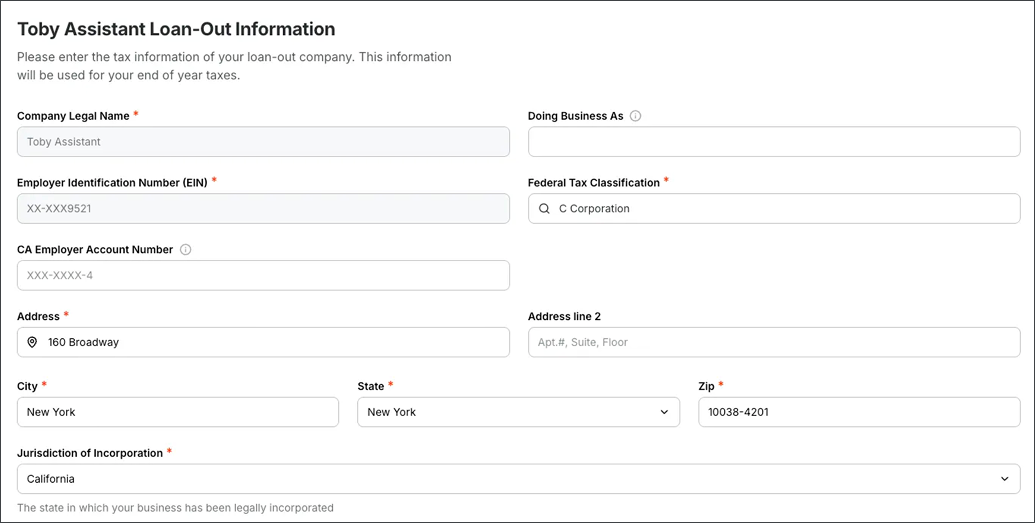
Example of a worker's Loan-Out Information page in Account settings
Payment Method
Click the Edit button to update your primary payment method.
You can choose to be paid either by:
Direct deposit (ACH)
Paper check
To learn more, go to How to set up your payment method.
Preferred Payment Preference
Click the Edit button to choose whether to send your Wrapbook payments to your agent or your bank account.
On the Preferred Payment Preference page, you’ll see a list of all the project you’ve joined. For each project, you can choose to have your payment sent to you or your agent.
To learn more, go to How to use Wrapbook when you have an agent.
End of Year Tax Forms
Click the Edit button to update:
Your Personal Tax Information
Your Electronic Tax Form Opt-in
Your year‑end tax forms are sent to your Wrapbook account electronically by default
If you prefer to receive paper copies of your Form W-2s and 1099s, click No. If you choose No, paper copies will be sent to you, but digital copies will still be available on your Tax documents dashboard.
Mailed forms are sent to the residential address listed under Contact Information
If you make updates to your End of Year Tax Forms information in Wrapbook, be sure to click the Save profile button once you’re finished.

Example of a worker's Personal Tax Information in Wrapbook. Click to edit the fields, if you make changes, be sure to click the Save Profile button at the bottom of the page.

Example of the Electronic Tax Form Opt-in Wrapbook
Demographic Questionnaire
This questionnaire collects the basic demographic information required to fulfill employer reporting obligations, this is mainly for unions and government agencies.
The information is stripped of any identifying details before it is submitted for individual projects or long-term trend reporting. All data collected is protected per the Wrapbook Privacy Policy.
If you update any of your answers to the questionnaire, be sure to click the Submit button when you are finished.
Union Dues Withholding
Click the Edit button to adjust your union dues withholding preferences.
On the Union Dues Withholding Preferences page, click the Edit button in any row listed to update the information.
If you make changes to any of the Union Dues Withholdings pages, be sure to click the Save button when you’re finished.
Paid Sick Leave
Click the View button to track and submit your paid sick time.
To learn more, see How to request sick leave.
Terms of Service
Click View to see Wrapbook’s Terms of Service Agreement.