Working with an agent
If you're a worker who’s represented by an agent that uses Wrapbook:
Your startwork can be completed by your agent
Your agent can view and receive payments on your behalf
Your agent will have access to review your payment information
Your agent's access is limited to payment-related activities and startwork. They cannot access your personal account settings or modify your profile information without your permission.
Request an agent during onboarding
If you're represented by an agent and want them connected to your project, you can request it directly from your onboarding sidebar — you don't need to contact the production company separately.
Note: The Your agent section in your onboarding sidebar first appears after your personal details step has been saved. It will not appear on the very first step of onboarding.
How to submit an agent request
During your onboarding, in the PROJECT DETAILS on the right side of the page, look for the section that says Do you have an agent that should be added to this project? and click the Notify production company link
In the Request to add agent popup, enter your agent's email address
Click the Notify production company button to submit the request
After you click the button, your PROJECT DETAILS will show your agent's email address with a Request in review alert. When a request is in review, you'll have the option to Edit it or Cancel it.
When you submit your request, the production company receives an email notification. Your agent will not receive any communication until the production company approves the request by completing the agent setup in Wrapbook.
What happens after you submit
The production company reviews your request. There are two possible outcomes:
Agent added: The production company completes your agent setup. Your sidebar updates to show your confirmed agent, and payments can be routed through your agency going forward.
Agent request declined: The next time you log in, you'll see a dismissible alert showing the production company's reason for declining. You can dismiss the alert and submit a new request if needed.
Setting up your payment method while your request is pending
While your agent request is under review, you'll see an Agency payment setup pending banner on your Payments step. You'll still need to set up a personal payment method as a backup — in case the request is not approved, payments will go directly to you.
To learn more about your payment options, see How to set up your payment method.
Agent fees
Automatic collection of agent fees can be set up by the production company. When an agent fee is set, it is added as a percentage increase to your gross wages and taxed as part of your total wages for that pay period.
Update your payment preferences
Your earnings can be directed to either:
You
Your agent
When setting up your payment preference, it’s important to remember:
Payments directed to agents will always be made in the form of mailed, paper checks - Wrapbook does not offer direct deposit of payments to agents
If you choose to have payments directed to you, you’ll be able to use direct deposit
Here’s how to add your payment preferences:
1. In the left-side navigation under All projects, click Settings
2. Next to Preferred Payment Preference, click the Edit button
3. On the Preferred Payment Preference page, you’ll see a list of all the project you’ve been added to. For each project, you can choose to have your payment sent to you or your agent.
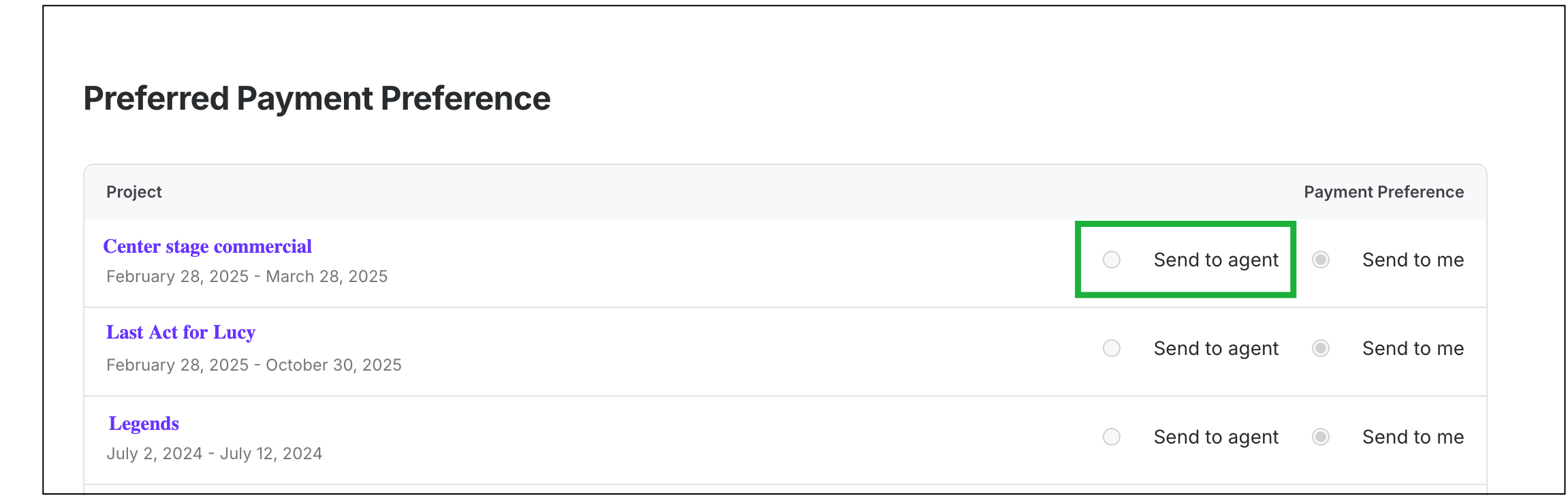
Choose Send to agent