Deleting a project worker’s timecard is permission based.
To delete a project worker’s timecard, your account must have one of the following roles enabled:
Role: Company Admin, Company Manager, or assigned Project Coordinator
Custom role with: Projects, People & Approvals/Project management - Full access, or Manage; Payroll & Financials/Timecards - Full access, or Create and manage
Overview
Deletion of a project worker’s timecard is:
✅ Allowed if the timecard has never been added to a batch or paid
🚫 Not allowed if the timecard is in a payroll batch or already paid.
➡️ If timecard deletion is not allowed, you can either remove it from the batch or reverse the payment first, then retry delete.
How to delete a project worker’s timecard
To delete a timecard that has never been added to a batch or paid:
Go to the project worker’s timecards page
At the top of the worker’s timecards page, click the dropdown menu to select the end date of the workweek that you want to delete
Click the Actions button and the select Delete timecard
In the confirmation popup, click the OK button
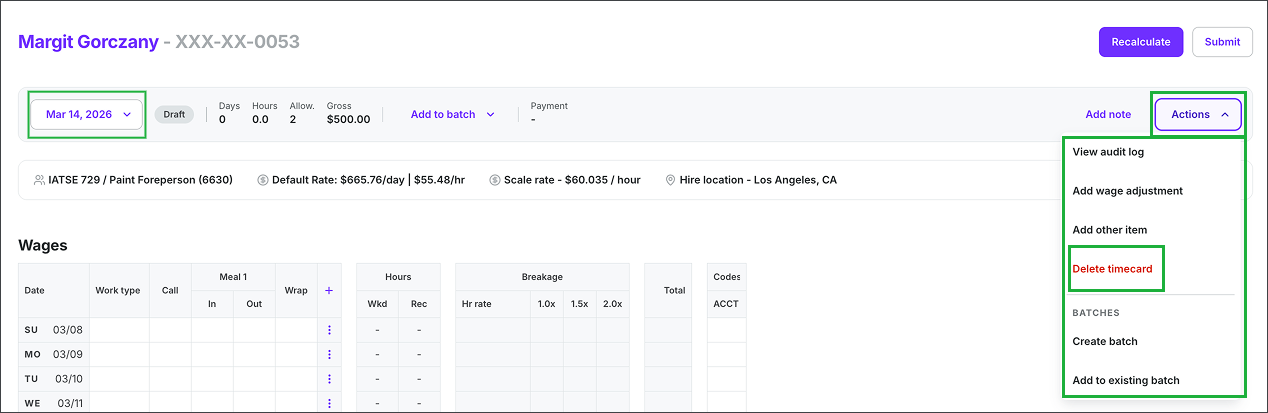
Select the workweek, click the Actions button and then select Delete timecard
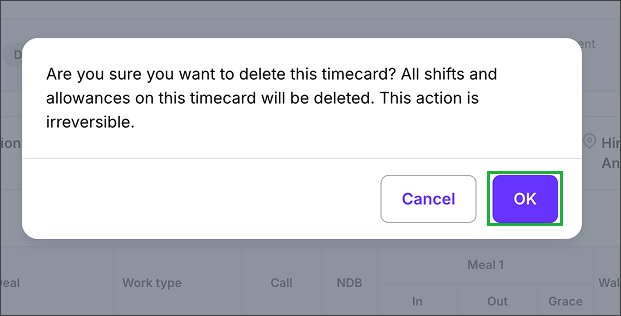
Click the OK button to confirm deletion of the project worker’s timecard
After deletion: what to expect
When a timecard is deleted, it may briefly appear in the timecards list as a Draft with a $0.00 balance before it is fully removed from the system. This is expected — the timecard is in the process of being cleared and will disappear on its own. No action is needed.
⚠️ Deleted timecards cannot be restored. Once a timecard has been fully removed from the system, there is no way to recover it automatically. If a timecard was deleted in error, it must be re-created from scratch.
How to re-create a deleted timecard
If you have a Company Admin, Company Manager, or assigned Project Coordinator role — or a custom role with timecard create/manage access — you can re-create the timecard:
Go to the project's Timecards dashboard
Click + Create timecard.
In the Create timecard drawer, search for the worker by name, title, department, week ending, union, or job title
Click Create next to the worker
Re-enter the worker's time details for the correct workweek
Save and recalculate, then submit the timecard for approval
💡 Tip: You'll need to manually re-enter all hours, allowances, and expenses from the original timecard. Double-check the workweek end date before saving to make sure it matches the intended pay period.
Payroll considerations
Keep in mind:
Timecard deletion is only possible if the timecard has never been added to a payroll batch or paid. If a timecard is already batched or paid, it cannot be deleted — remove it from the batch first (or reverse the payment), then retry deletion.
If a timecard was deleted after payroll was already processed, contact the Wrapbook Support Team to discuss a payroll reversal before re-creating the timecard. Re-creating a timecard after payroll has run without reversing first can result in a duplicate payment.
Re-created timecards go through the standard approval workflow before they can be batched for payroll