Overview
Vendors are external suppliers and service providers that productions work with to bring their projects to life. These can include equipment rental companies, catering services, transportation providers, set construction companies, and costume suppliers.
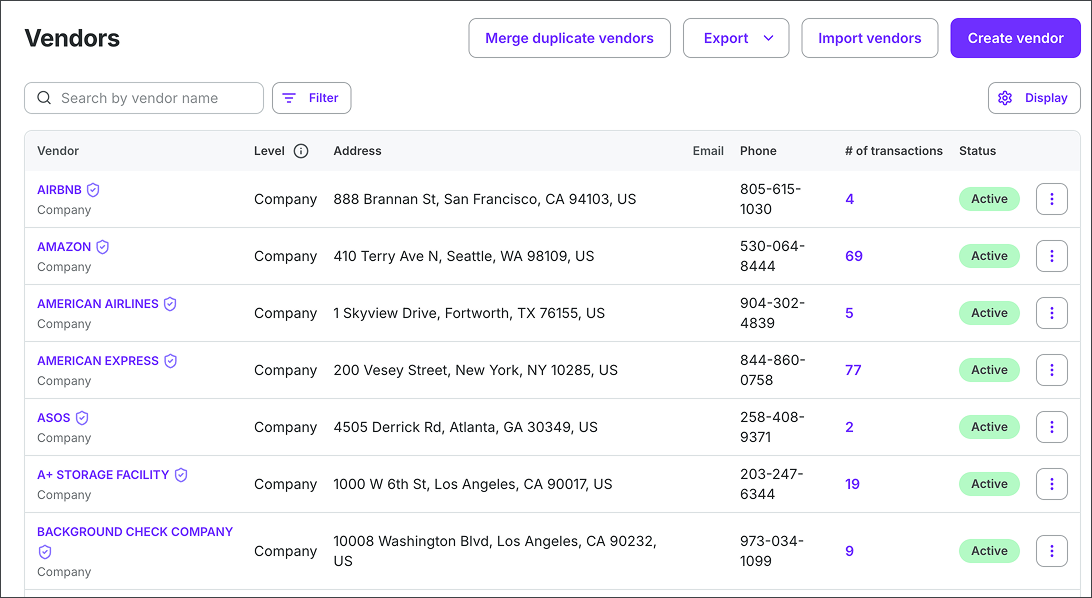
Example of the Vendors dashboard in Wrapbook
Tax reporting
Here’s some important things to remember about vendors and tax reporting:
Vendors must have a tax ID and address
Vendors are marked as taxable unless they are C-corp or S-corp entities
Wrapbook can handle e-filing of 1099s for vendors paid via the Production Accounting Suite (PAS)
Vendors FAQ
To help you manage vendors with Wrapbook, we’ve put together this list of frequently-asked questions.
Click the arrow next to a question to see the answer.
How does Wrapbook store vendor information?
Vendors are stored at the company level in a unified database that works across your entire production slate.
This allows you to:
Access vendor information across all projects
Prevent duplicate entries through EIN organization
Maintain accurate vendor records
What vendor documentation can I store in Wrapbook?
Wrapbook allows you to store and organize:
W-9 forms
Tax documentation
Vendor contracts and agreements
Insurance certificates
How do I export vendor information?
You can export vendor information through the Vendors page. Available export options include vendor details and documentation.
Can I use Wrapbook to pay vendors?
Yes, you can use Wrapbook to pay vendors if:
The Production Accounting Suite (PAS) is enabled for your company’s Wrapbook account
Your company has the ability to transfer payment funds via an ACH bank transfer or CASHétPay account
To learn more, see About vendor payments (PAS).
How does CASHétPay work?
CASHétPay is a third-party payment provider integrated with Wrapbook's Production Accounting Suite (PAS) for processing vendor payments. Your company must have a CASHétPay account to process vendor payments through PAS.
Here’s an overview of the vendor payment workflow:
AP invoices are processed in Wrapbook
The Confirm and pay button is used to move invoices to Pending payment
CASHétPay will coordinate with vendors to complete payment using your preferred method: credit card, ACH, or check
After a vendor payment is initiated you can track payment status in real-time through Wrapbook's interface
What vendor reports are available?
Wrapbook provides comprehensive reporting tools including:
Vendor activity reports
Vendor spend tracking across projects
Payment history monitoring
Outstanding purchase order reviews
How do I handle vendor 1099s?
With Wrapbook PAS you can:
Mark vendors as taxable or non-taxable
View and update vendor 1099 information
Export vendor 1099 data
E-file vendor 1099s through Wrapbook's IRS integration
Can vendors have more than one address in Wrapbook?
Yes. Vendors can have multiple addresses on file, so you don't need to create duplicate vendor records when a remittance address differs from a work location.
When a vendor has multiple addresses:
One is designated as the tax address used for 1099 reporting
On POs and AP invoices, the vendor dropdown will show one listing per address — select the listing with the address you want to use
Can Wrapbook process payments to accounts outside the U.S.?
No. You can store foreign bank details for reference and record keeping, but Wrapbook doesn’t process payments to accounts outside the U.S.
What bank details can I store for a foreign bank account?
When creating or updating a vendor, click Add bank account and enter the details requested for the account, such as Bank country / region, IBAN, Sort code, BIC / SWIFT, Account number, and Type. The fields shown may depend on the bank account and the information you need to record.
Foreign bank details are stored for reference only. Wrapbook doesn’t process payments to accounts outside the U.S.