Overview
Startwork documents are essential files needed to hire workers and ensure compliance with legal and production requirements. These include both mandatory documents (like tax forms) and production-specific documents (like NDAs and crew deal memos).
Access Startwork
Startwork is permission based
To update, your account must have one of the following roles enabled:
Role: Company Admin, Company Manager, Project Coordinator
Custom role with: Worker hiring and startwork - Full access, Project access only
To access Startwork:
In the left-side navigation, click the dropdown menu
In the dropdown menu, select All projects
In the left-side navigation, click Startwork
Startwork actions
Below is a list of actions you can take to manage startwork in Wrapbook:
Startwork FAQ
To help you understand the Startwork features in Wrapbook, we’ve put together this list of frequently-asked questions.
Click the arrow next to a question to see the answer.
What is startwork?
Startwork documents are essential files needed to hire workers and ensure compliance with legal and production requirements. These include both mandatory documents (like tax forms) and production-specific documents (like NDAs and crew deal memos).
What are smart fields?
Smart fields are dynamic fields in startwork that automatically populate with worker and company information, reducing manual entry and ensuring accuracy.
How are government-mandated forms handled?
Forms like I-9 and W-4 are automatically assigned to workers when they join a project. The worker will be required to complete these forms before they can be added to payroll.
What if a worker or their agent prefers to complete paper versions of tax forms?
While Wrapbook makes it easy to collect worker payment information and tax documents digitally, sometimes workers or their agent will prefer to work with paper documents.
In these cases you can:
Invite the worker to the project. When paper forms will be used, you can skip Step 4 Assign Startwork.
Collect their completed paper Forms W-4, W-9, and I-9
Create digital copies of each form with a document scanner and then add them to the project’s Documents
Notify your paymaster via email once you’ve uploaded the documents
Where can I find more templates for memos, agreements, and contracts commonly used in the production industry?
Wrapbook provides a library of templates for:
Click here to access all available templates.
In the Wrapbook’s template library, you can download common employer templates, including:
Wrapbook also provides government forms for productions including:
How do I edit the Crew Deal Memo and other Wrapbook startwork templates?
In order to edit a startwork template like the Crew Deal Memo, you’ll need to duplicate it first, and then edit the copy.
Click here to see step-by-step instructions on how to edit a Wrapbook startwork template.
What happens when a startwork approval workflow is changed?
When you make changes to an existing startwork approval workflow, alerts will tell you:
What startwork documents have been affected
Any options you have for updating them further
Be sure to pay attention to the specific alerts that display, as your options will differ based on if you’re:
Adding new approvers, or
Replacing or removing approvers
Adding new approvers
When adding new approvers:
You’ll be required to manually add the new signature fields to each document
Once this is done, the new approvers will be applied on any unsigned documents that have already been issued to workers and all newly issued startwork
Replacing or removing approvers
When replacing or removing approvers:
The signature and smart fields will be automatically updated
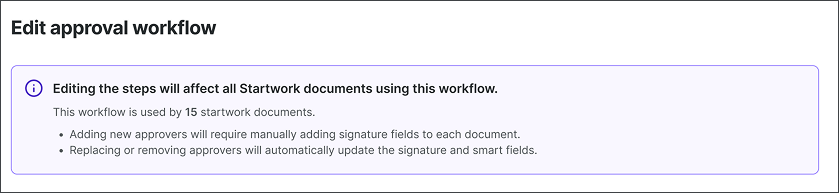
Alert displayed when a startwork approval workflow is in the process of being updated
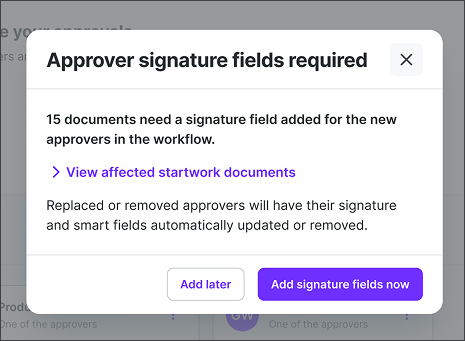
Example of an alert displayed when startwork documents in an approval workflow require new signature fields

Example alert shown on individual Startwork documents in an approval workflow when new approver signature fields are required
How do changes to startwork approval workflows impact documents assigned to project workers?
The table below shows how updates to a startwork approval workflow impact documents already assigned to project workers.
Document Status | What Happens |
|---|---|
Assigned to workers, but not yet signed |
|
Signed by worker, but not yet approved |
|
Signed and approved |
|
For more information about configuring and using startwork approval workflows in Wrapbook, see Approval workflows.
For more information about adding startwork approval signatures see Electronic signature lines.
If a doc gets reassigned to a worker, does the worker get notified by Wrapbook? Or do we need to reach out to the worker?
Documents typically get reassigned to workers in these scenarios:
When startwork documents have issues or are updated - If a document needs to be revised after being signed, it may need to be unassigned and then reassigned to the worker. This requires the worker to sign again.
When approval workflows change - If an approval workflow is added or modified after a worker has already signed documents, the affected documents may need to be reassigned for the new workflow to take effect.
When document fields or content are updated - If smart fields or other document content needs to be changed (like updating company information), documents may need to be unassigned and reassigned to reflect the updated information.
Important notes:
When documents are reassigned, workers will need to re-sign the documents
The worker will receive a notification from Wrapbook when documents are reassigned to them
Any previous signatures are typically lost when documents are unassigned and reassigned
A rehired worker is being prompted for a full new I-9 even though their original is valid. Is this correct?
Yes, if the worker completed their original I-9 before March 17, 2025 (using Wrapbook's previous I-9 experience), they will be prompted for a new I-9 when rehired. This is a one-time migration to the updated experience. The worker will need to complete Section 1 again and have an admin complete Section 2.
The worker's employment authorization (EAD, visa, etc.) has expired since their original I-9. What do we do?
The worker must reverify by providing a new, unexpired document from List A or List C. Use the reverification section of Supplement B.
Can I complete Supplement B on behalf of the worker?
No. Section 1 (which is carried over from the original I-9) must reflect what the worker attested to. For Supplement B specifically, the employer or authorized representative completes the reverification/rehire section — the worker does not need to take action unless their documents have expired.