Startwork packets are permission based
To sign off on project worker startwork packets, you must be a company team member that’s included in the project’s startwork approval workflow.
Overview
Company team members that are part of the project’s startwork approval workflow can use the Sign all button to sign all of a worker's startwork documents at once, directly from their worker profile. This saves you from opening and signing each document individually, making it faster to process startwork across your crew.
The Sign all button is only available after the worker has completed and signed all of their startwork documents.
Note: Sign all is not available for startwork packets that include legacy startwork documents. If the startwork packet includes legacy startwork documents, they’ll need to be signed individually.
How to bulk sign a project worker's startwork
The first time you use Sign all, you'll be prompted to verify your identity by typing your full name. After that, subsequent signings in the same session only require a one-click confirmation.
First time bulk-signing a project worker’s startwork packet:
In the left-side navigation, click the dropdown menu and select the project
In the left-side navigation, click People
On the project’s People dashboard, click on the worker’s name to go to their project-level worker profile
In the Startwork section, click Sign all
First time signing in this session: A popup will prompt you to type your signature. The name you enter must match exactly the name displayed in the popup. Click the Sign all documents button to continue.
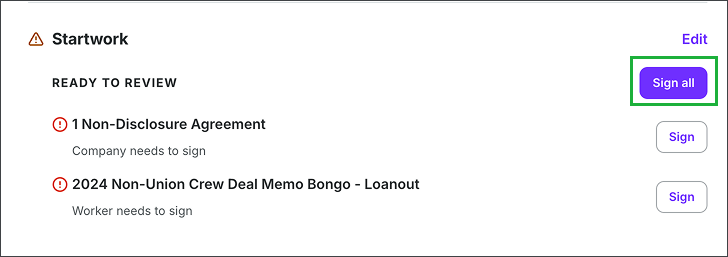
In the project-level view of the worker’s profile, under Startwork, click the Sign all button
Subsequent signings
On the project’s People dashboard, click on the worker’s name to go to their project-level worker profile
In the Startwork section, click Sign all
A confirmation popup will appear saying You're about to sign all documents in [Worker]'s start packet. Please confirm to continue. Click the Sign all documents button to continue
Once you click the Sign all documents button, Wrapbook will begin processing your signatures. Once complete, the documents will display your signature on all startwork within the packet.