Exporting project worker timecards is permission based.
To access project worker timecards, your account must have one of the following roles enabled:
Role: Company Admin, Company Manager, or assigned Project Coordinator
Custom role with: Projects, People & Approvals/Project management - Full access, or Manage; Payroll & Financials/Timecards - Full access, Create and manage, Approve only, or View only
Overview
In the New Timecards Experience you can export data for reviews, audits, or sharing with accounting directly from the Timecards dashboard and any project worker’s Timecards page.
How to export all timecards for a project
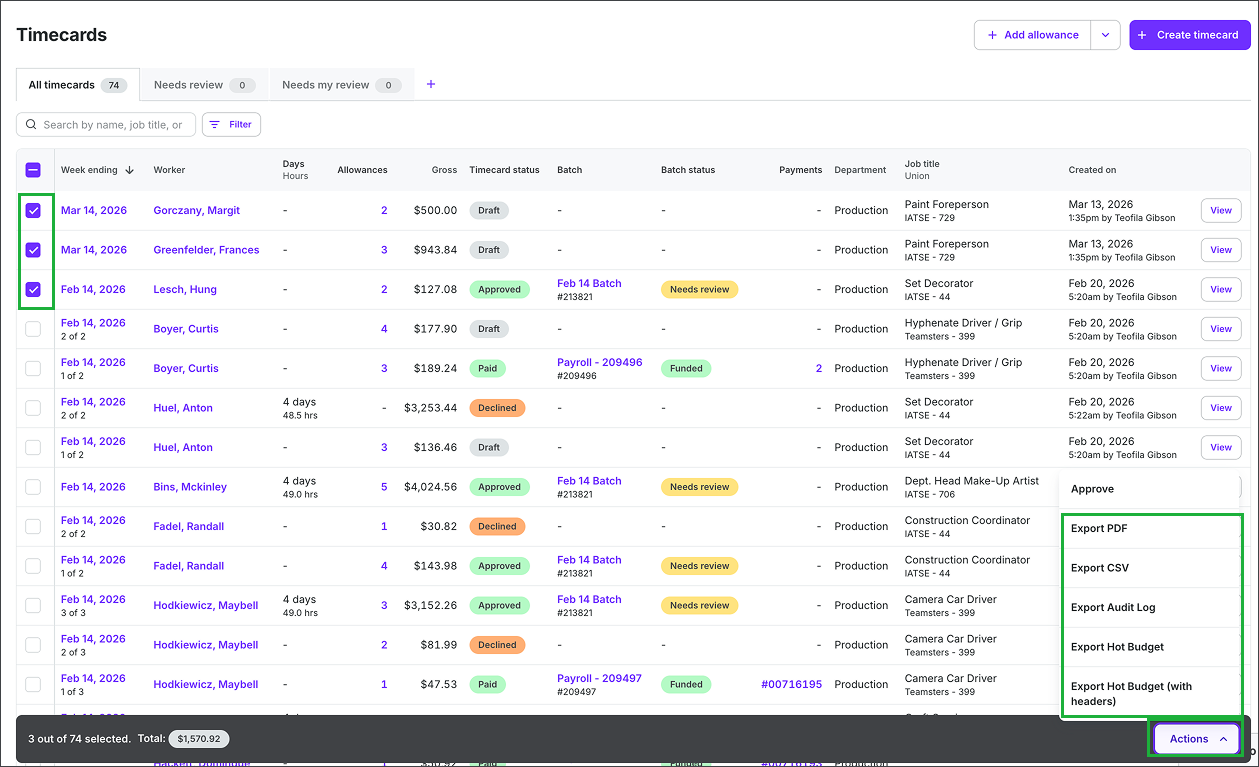
To export all or selected timecard data for a project:
Go to the project’s Timecards dashboard
Click the checkboxes to select the timecard submissions that you want to export
Click the Actions button, and then click to make your selection
Export PDF
Export CSV
Export Audit Log
Export Hot Budget
Export Hot Budget (with headers)
The file will automatically download to your computer. When the export is ready, an alert will appear at the top of the page. You can click the link in the alert to open the file.