You can access a company’s projects from the All projects dashboard.
Access the All projects dashboard
To go to the All projects dashboard:
From the left-side navigation, click the dropdown menu
Select All projects
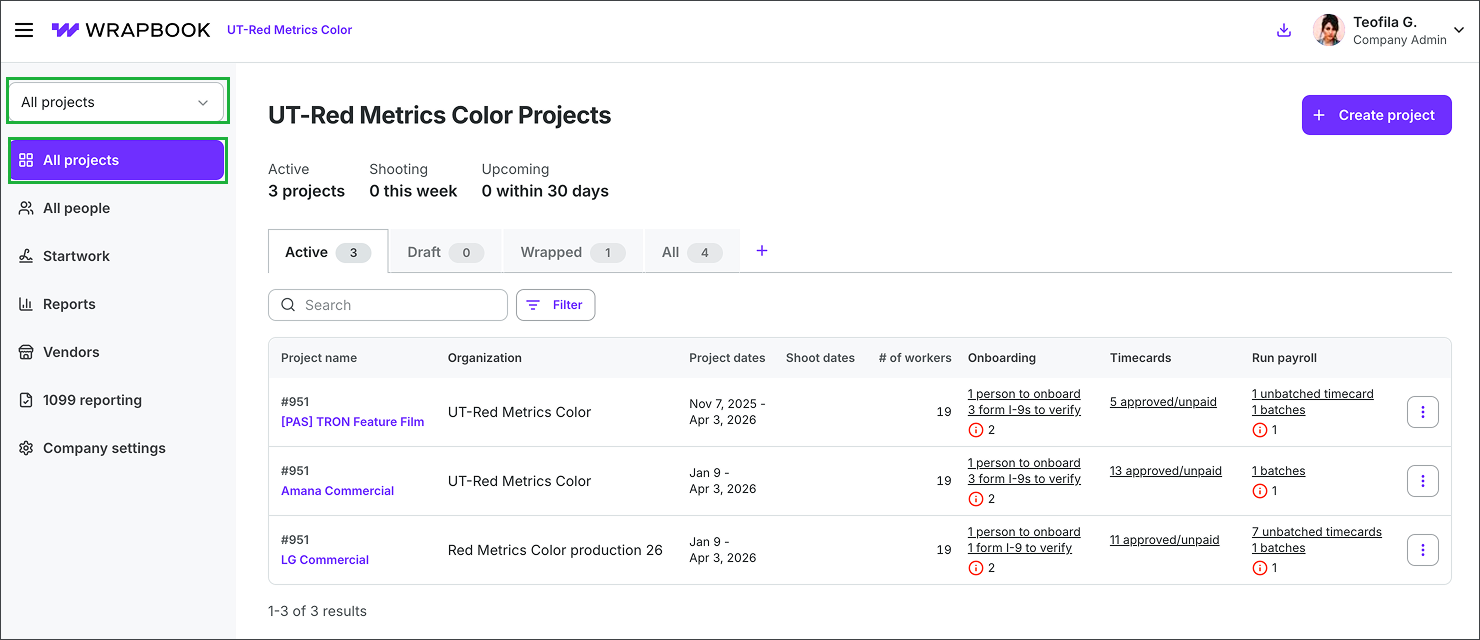
Click the dropdown menu and select All projects
All projects dashboard information
On the All projects dashboard you can:
Click the tabs to view Active, Draft, Wrapped, or All projects
Find projects by entering a project name or project number in the Search bar
Click the Filter button to view projects by Organization, Pending tasks, Project dates, or Shoot dates
Filter projects by status using the Active, Wrapped and Draft tabs
Sort by Project name, Project dates, Shoot dates, # of workers in ascending or descending order by clicking on the column headers
See project alerts indicating outstanding items that need attention. You can hover your cursor over a project alert to see its details.
Access a project, by clicking the project’s name in purple
All Projects dashboard actions
You can take the following actions from the All projects dashboard:
Create a project - Click the +Create project button
Duplicate a project - Click the three dots next to a project and then select Duplicate
Unsubscribe from project email notifications - Click the three dots next to a project and select Unsubscribe
Wrap project - Click the three dots next to a project and select Wrap project. When you wrap a project:
The project will become inactive
Timecards can no longer be created or approved
Any timecards that were approved before wrapping the project can still be paid