Overview
Worker classification plays a major role in determining how payroll is run. It dictates whether workers qualify for workers compensation, how taxes are withheld, and what processing costs are applied. Miscatagorizing workers can be highly disruptive, so it's important to be careful about how you're classifying your workers.
Worker types
Workers are categorized during onboarding, and must be correctly labeled before the first payroll is run.
There are two options for worker types in Wrapbook: Employee (W-2) and Loan Out (Company)
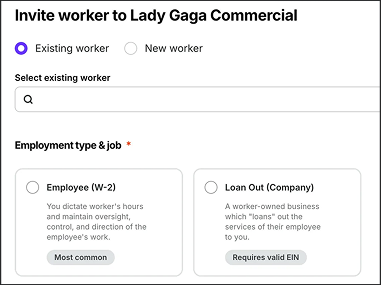
When inviting a worker to a project in Wrapbook, you can click to choose either Employee (W-2) or Loan Out (Company)
Employee (W-2)
Employees typically make up the bulk of your workforce.
When a worker is classified as an Employee (W-2):
Wrapbook is their Employer of Record for the sake unemployment, and tax withholdings
They’re covered under Wrapbook’s workers compensation policy
They get taxed under their SSN
In Wrapbook, you’ll be able to specify the number of hours the employee will work each week:
Variable hours hours vary by week
Full time >30 hours a week
Part time <30 hours a week
Loan Out (Company)
A loan out typically requires an individual to have an EIN and must have an S-Corp, a C-Corp, or be an LLC that files as an S or C. No other incorporation types will be serviced as a loan-out.
When a worker is classified as a Loan Out (Company):
They’ll receive a 1099-NEC
No employer payroll withholdings will be owed
They’re covered under Wrapbook’s workers compensation policy
You can view their tax information on their worker profile
Required information for loan outs
The following information is required when a worker is set up as a loan out in Wrapbook:
Company Legal Name
Employer Identification Number (EIN)
Federal Tax Classification
Address, City, State, and Zip
Jurisdiction of Incorporation
When hiring a loan-out worker who’ll be working in California, you can optionally enter their CA Employer Account Number. If you don’t have their CA Employer Account Number, or the loan-out won’t be working in California, you can skip this field. Learn more about this option and related requirements on the California EDD website.
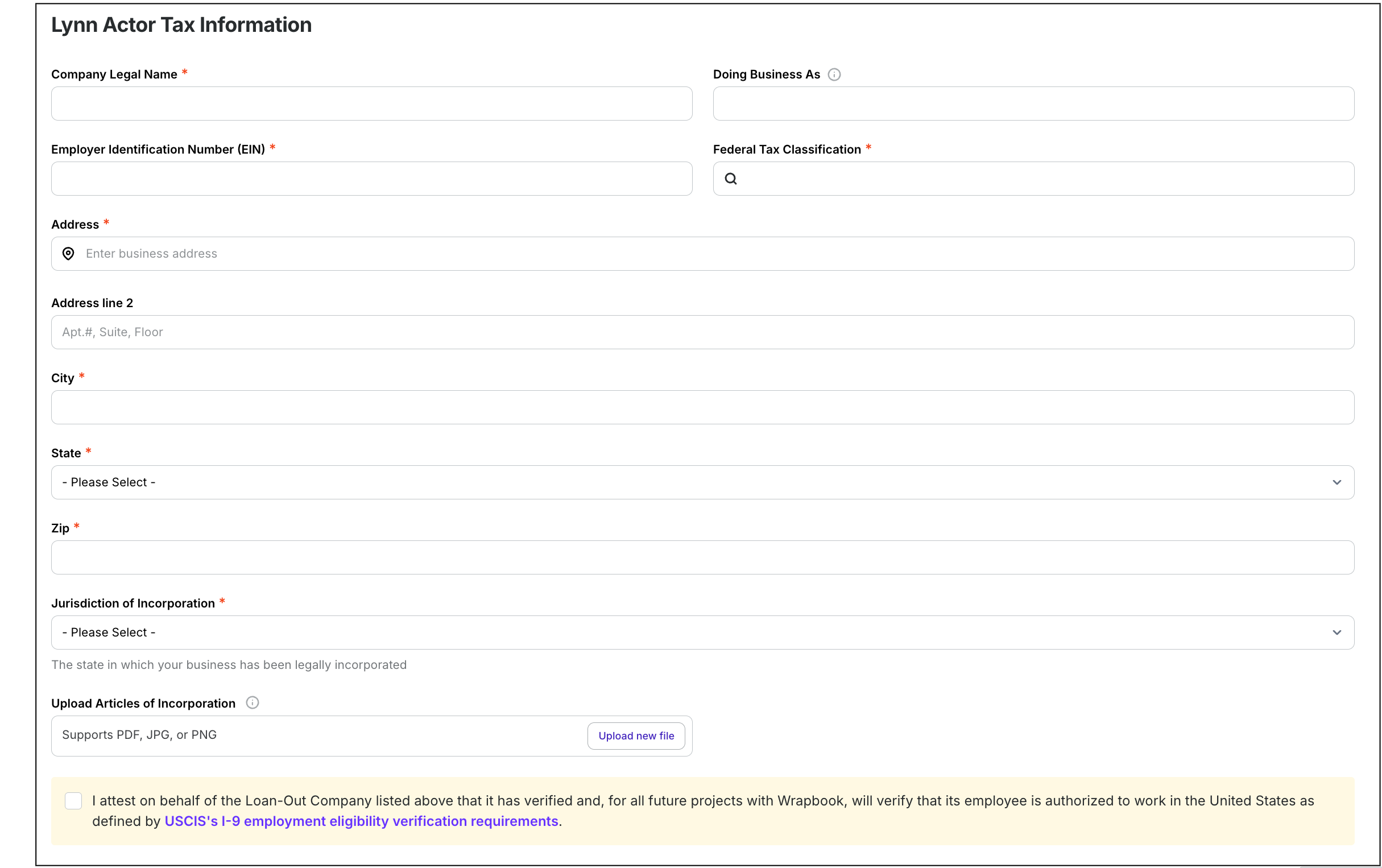
Example of the information required for loan outs
Payment methods for loan outs
When inviting a loan-out worker to a project, you’ll have the option to set their payment method as either of the following:
Time based payment (recommended) - When you choose Time based payment, loan-out workers will use the standard timecard submission and approval process through Wrapbook.
Invoice based payment - When you choose Invoice based payment for a loan-out worker, they’ll be able to submit their invoices through Wrapbook instead of using timecards.
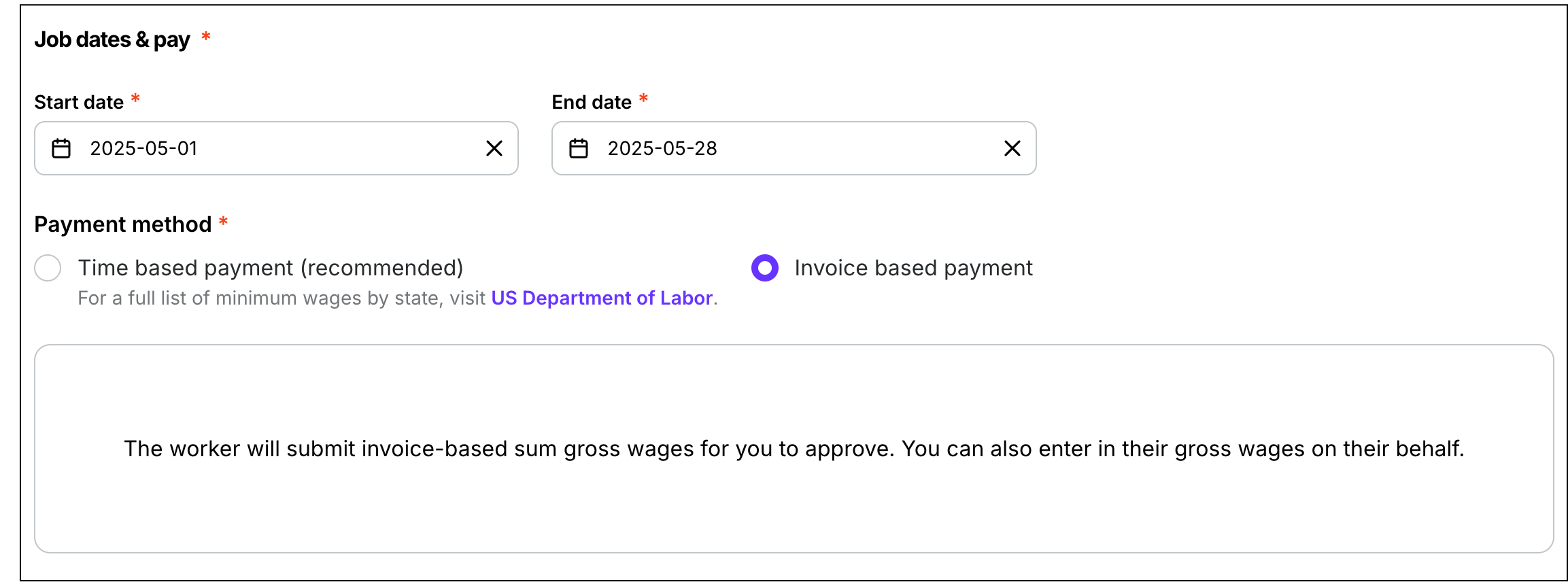
You can set up loan-out workers payments as time based or invoice based
Which business entities are eligible for Loan Out status?
To be paid as a Loan Out in Wrapbook, the worker's business must be one of the following:
S-Corporation (S-Corp)
C-Corporation (C-Corp)
Limited Liability Company (LLC) filing taxes as an S-Corp or C-Corp
The following entity types are not eligible for Loan Out status:
Sole proprietors
General partnerships
LLCs not filing as S-Corp or C-Corp
If a worker has one of these ineligible entity types, they must be classified as an Employee or Contractor in Wrapbook.
What if a worker says they have an LLC. How do I know if they qualify as a Loan-Out?
Not all LLCs are eligible for Loan-Out classification in Wrapbook. To qualify, a worker's LLC must be taxed as either an S-Corp or C-Corp — a standard single-member LLC that has not made that election does not qualify.
The key question to ask the worker is: "Does your LLC file as an S-Corp or C-Corp with the IRS?"
If yes: They can be set up as a Loan-Out in Wrapbook. You'll need their company legal name, EIN, federal tax classification, and address to complete onboarding.
If no: Their LLC is likely classified by the IRS as a disregarded entity and cannot be processed as a Loan-Out. In this case, the worker would need to be classified as an Employee (W-2) or, where applicable and compliant with state law, as a Contractor.
This is an industry-wide standard. Wrapbook enforces this rule to protect your production from compliance risk — misclassifying a worker can expose the hiring entity to IRS audits and penalties.
What if the worker pushes back?
If a worker insists they should be paid as a Loan-Out but cannot confirm S-Corp or C-Corp status, the appropriate path is to classify them as a W-2 employee until they can provide confirmation of their IRS tax election. You can direct them to Wrapbook's worker-facing Help Center article on worker classification for more information about their options.
If the worker later obtains S-Corp or C-Corp designation, reach out to the Wrapbook Support Team to update their worker type on your project.
Contractor
The legality of whether a worker can be classified as a contractor varies greatly from state to state, but in most cases, if a production company gives a worker direction or a call time, they most likely cannot be called a contractor.
Different states apply different standards to determine whether or not a worker may be classified as an independent contractor. Two common ones include the ABC Test and the Common Law Test. For more information on worker classification tests, see the Wrapbook blog post, Worker Classification Tests by State.
When a worker is paid as a contractor:
The production company serves as the EOR
Contractor vs. Loan Out — what's the difference?
Both Contractors and Loan Outs are used for individuals who are not being paid as employees, but they are set up and paid differently in Wrapbook.
Key rule: If a worker wants to be paid through a business entity, they must be set up as a Loan Out — and their business must qualify (S-Corp, C-Corp, or LLC filing as S-Corp or C-Corp). If their entity does not qualify, or they don't have a business entity, they should be set up as an Employee or Contractor, not a Loan Out.
Contractor | Loan Out (Company) | |
|---|---|---|
Payments remitted to | Worker's SSN or TIN | Business entity's EIN |
Business entity required? | No | Yes (S-Corp, C-Corp, or qualifying LLC) |
Wrapbook is EOR? | No — production company is EOR | No — worker's loan-out company is EOR |
Workers' comp covered? | No | Yes |
Year-end form | 1099-NEC (issued by production) | 1099-NEC (issued by Wrapbook to loan-out entity) |
Payroll taxes withheld? | No | No |
Workers vs. Vendors — what's the difference?
In Wrapbook, worker classifications (Employee, Loan Out, Contractor) apply to people who are performing labor on a production. Vendors are a separate category and are not set up as workers in Wrapbook.
A Vendor is a business that provides non-labor services or goods to a production — for example, equipment rental, camera gear, or facility rentals. Vendors are paid separately from workers and are not onboarded through Wrapbook's worker workflow.
If you're unsure whether someone should be set up as a worker or handled as a vendor, consider:
Worker: A person performing labor on set or for the production (for example, a grip, editor, coordinator)
Vendor: A business providing non-labor goods or services (for example, a camera rental company)
Common scenarios
To help. you understand how workers are classified in Wrapbook, we’ve listed some common scenarios below. Click on a scenario to learn more.
My worker wants to be paid through their LLC
First, confirm what type of LLC it is. If the LLC files taxes as an S-Corp or C-Corp, the worker is eligible to be set up as a Loan Out in Wrapbook. If the LLC is taxed as a partnership or is a single-member LLC not filing as S-Corp or C-Corp, the worker is not eligible for Loan Out status in Wrapbook and should be classified as an Employee or Contractor.
My worker says they've always been paid as a 1099 contractor on other productions
This is common, but classification depends on the worker's role and your state's laws. In California and several other states, most on-set workers must be classified as Employees under the ABC Test. Setting someone up as a Contractor when they should be an Employee can create compliance risk. If you're unsure, consult your legal or payroll team — it could be the safest for compliance to default to Employee.
What's the difference between a contractor and a loan out? My worker isn't sure which one they are.
If the worker is being paid through a qualifying business entity (S-Corp, C-Corp, qualifying LLC) under that entity's EIN — they're a Loan Out. If the worker is being paid as an individual under their SSN or TIN, without a qualifying business entity, they're a Contractor — consider the classification rules applicable to you, as they could be an Employee.
My worker is a sole proprietor. Can they be a loan out?
No. Sole proprietors are not eligible for Loan Out status in Wrapbook. The worker would need to be classified as an Employee or Contractor.
Change worker classifications
Worker types are configured in the Details section of a project’s settings:
In the left side navigation, click the dropdown menu
Select the name of the project that you want to update worker classifications for
In the left side navigation, click Project settings
On the Project details page, scroll down until you see the section called What kind of workers will be hired?
From here, you can click to enable or disable worker types
Worker types cannot be updated when:
The worker already received payment
In this instance, our Operations team will need to process a reversal of the payment and correct the worker type. Please reach out to the Support Team for assistance.